A simpler phone for someone you care about
Their home screen shows only the apps you chose together. A few others get some minutes a day. When the minutes run out, they ask you, and a code from your phone gives them more.
Guardian Mode is part of Premium: free for the first month on every phone, and free for life for everyone who joins the Google Play test. Their phone: Android 8 or newer; 3Taps isn't available on iPhone. To send codes, use 3Taps (free) on your Android phone, or Google or Microsoft Authenticator on an iPhone.
Their home screen: the apps you chose. Apps with an allowance show the minutes left today.
- Phone
- Messages
- Camera
- Maps
- Minecraft · 5 min
- YouTube · 10 min
- Aarav asks, from the time's-up screen. A ready-to-send text goes to you.
- You open 3Taps and pick how much extra time.
- You read out or text back the code.
- Aarav enters it, and the app opens for that long.
An illustration using the app's own screen wording. Names and the code are examples. Codes are worked out on each phone, so they work without the internet.
Phone and Messages, plus up to 8 apps you pick together. These open as usual.
5, 10, 15 or 20 minutes a day for a game or YouTube. Everything else stays locked.
5 to 60 more minutes with a one-time code, or your PIN in person.
For a child
What they see
- A quiet home screen with only their apps, and the minutes left beside the ones with an allowance.
- When time is up: a clear message, and “Ask for more time”.
- The same Done button as yours, to finish and put the phone down.
What you control
- Which apps are on their home screen.
- Daily allowances, and how much extra to give each time.
- Guardian settings, Android Settings and uninstalling need your PIN. Uninstall protection also needs “Turn the screen off”. Restarting in Android's Safe mode gets round this, as it does for any app.
Phone and Messages always stay on their home screen. Calls, emergency numbers and payment apps are designed to stay available; check them on the actual phone before relying on it.
For an older relative
- Phone
- Messages
- Camera
- Photos
Just the apps they use, in text that can be made extra large: no wall of icons, nothing to get lost in. Agree together which apps belong there.
Find the app → use it → Done. Done takes them back home and locks the phone.
Need an app that isn't there? The locked screen offers Call Ravi and Send Ravi a message. Ravi reads out a code, and no visit is needed.
If the helper can't be reached: tapping “Can't reach Ravi?” switches Guardian Mode off by itself after a waiting time you choose at setup (15 minutes, 1 hour, 4 hours or 1 day). The recovery code, shown once at setup, unlocks it straight away. The waiting time isn't offered on a child's phone.
What you need
- Their phone: Android 8 or newer, with 3Taps as the home screen and Guard switched on. Guardian Mode is part of Premium; the first month is free, so you can try it before buying.
- Your phone, to send codes from anywhere: an Android phone with 3Taps (free; no Premium needed). Open Settings › Guardian Mode › I'm a helper and scan the QR code shown during setup.
- If you have an iPhone: scan the same QR code with Google or Microsoft Authenticator. It gives 15-minute codes; choosing other amounts needs 3Taps on Android. In person, your PIN always works.
What it can and can't do
Guardian Mode makes the everyday phone simpler and keeps agreed boundaries. It isn't a complete child-safety system.
It can
- Keep chosen apps on the home screen and lock the rest.
- Give small daily allowances, with extra time on request.
- Keep Guardian settings, Android Settings and uninstalling behind your PIN.
- Work without a supervised Google account, including for adults.
It can't
- Filter websites or content inside apps.
- Show you their location, messages or activity, or let you change things remotely.
- Stop someone restarting into Android's Safe mode, which gets round any app.
- Run on iPhone.
Setting it up
Do it together, on their phone.
- Choose who the phone is for: a child, or someone else such as an older parent.
- Set your PIN and write down the recovery code, away from the phone.
- Choose the home-screen apps. Phone and Messages are always there; add up to 8 more, or none.
- Give a few apps daily minutes, such as 15 minutes of a game.
- Link your phone as the helper by scanning the QR code, then practise asking for more time once before handing the phone over.
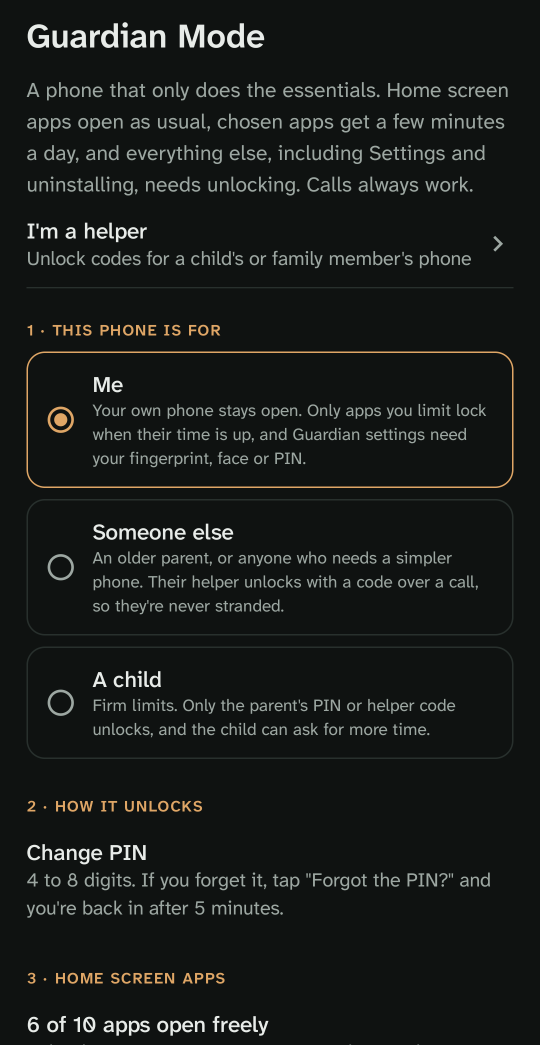
The Guardian setup guide has every step.
3Taps and Google Family Link
They do different jobs. We haven't tested both on the same phone yet, so if you use Family Link too, check the allowed apps behave as you expect.
| Google Family Link | 3Taps Guardian Mode | |
|---|---|---|
| Who it's for | Children with a supervised Google account | A child or an adult; no special account |
| Main job | Limits, schedules, content and purchase approvals, managed from a parent's phone | A simpler home screen with chosen apps, allowances and asking for more time |
| Extra time | Bonus time from the parent's app | A code read out over a call or sent by message, or a PIN in person |
| Parent's phone | Android or iPhone | Android with 3Taps; or any phone with an authenticator app, for 15-minute codes |
Family Link details are from Google's own help pages and may change.
Questions
Can my child switch it off?
Changing Guardian settings, opening Android Settings and uninstalling need your PIN. Turn on “Turn the screen off” in 3Taps for the uninstall protection. Restarting into Safe mode can get round any app, so talk about the agreement too.
Can they switch back to their old home screen?
Not while Guardian Mode is on: that's changed in Android Settings, which needs your PIN. You can turn Guardian Mode off at any time with your PIN or the recovery code.
What if I forget the PIN?
Use the recovery code shown when you set the PIN. On a phone set up for someone other than a child, the waiting time also switches Guardian off if no helper can be reached.
Do the phones need the internet for codes?
No. Both phones work the code out from the time and a key they shared when you scanned the QR code, so the phones' clocks need to be right.
Can I see what they do on the phone?
No. 3Taps doesn't send their activity, messages or location anywhere. Allowance use is counted on their phone only.
Does it work on iPhone?
The phone being simplified must be Android. A helper with an iPhone can give 15-minute codes with Google or Microsoft Authenticator.
Try it
3Taps is in testing on Google Play. Join the test to install it on their Android phone. Guardian Mode is part of Premium: the first month is free on every phone, and testers keep it free for life.
Test it on Google Play